I'm writing this to explain why HTMLRadar exists, because the reason came out of my own week, not a market map.
I run an AI company. Last year I stopped sending investor decks as PDFs, and the specs, weekly updates, board pre-reads and client proposals followed. Most of what I send now was not typed by a person. An agent wrote the first pass, and what came back was HTML.
That is not a quirk of one tool. Two things changed at once.
The writer changed. When an agent produces a document, HTML is the natural output, because it is the one format that holds everything a plan needs in a single file: a table that keeps its shape, a diagram as SVG, a chart that recalculates when you change a number, a section that unfolds when the reader wants the detail. It reflows on a phone and still prints if someone insists. Nobody reads a hundred-line markdown file. The HTML version gets read. PDF was built for the printer; the documents I send now never reach one.
The reader changed. A PDF arrives as an attachment. An HTML link is a page the recipient opens on a phone, in an inbox, and increasingly next to an assistant of their own: they hand it over, headings and tables intact, and ask questions about it. The documents that matter now end in .html, and they are read by people and by the tools those people bring with them.
Then I wanted to know whether anyone had read one. That is the whole point of sending HTML, and I had no way to check. My document was a live page, not a file. So I built the tracking for HTML.
What it does

- Upload an HTML file or paste a URL you already host, create one tracked link per recipient, send it.
- The dashboard shows one row per viewer: which sections they read, how long they actively read, how far they scrolled. An email arrives on the first open.
- Each link has its own email gate, password, expiry, allow-list by domain or address, and a revoke switch. One document, many links. Password, expiry and allow-list stay editable after sending.
- Attachments ride under the same link (the model, the cap table, a ZIP). Replace the file and every link you already sent shows the new version.
- The point is the follow-up: you write back about the section they re-read, not "just checking in".
How it works
The mechanics, briefly, because they are what you are trusting.
- A Cloudflare Worker serves your document at
/r/{slug}, checks the link's gates, and injects the tracker on the way through. The recipient sees your document, not a re-rendered copy. - The tracker is about 8 KB gzipped.
- Sections come from your markup: headings first, then slide or page containers, then paragraph buckets for plain prose.
- A section starts counting only after it has stayed half visible for a full second, and a read counts after three such seconds. Scrolling past a slide never counts. A five-second idle watchdog stops the clock when nothing happens; mouse movement is ignored on purpose.
- Every document runs in a sandbox with no access to the application's storage.
What gets recorded
The whole list, so you can decide before you send anything: an email address when the recipient enters one at a gate, otherwise a random browser id; the time of each open, the referrer, the user-agent string and the device, browser and OS read from it, coarse location, time per section, scroll depth, active reading time, and which attachments were downloaded. We never record what a reader types or where they point; we only count whether the page is being read. No DOM snapshots, no session replay, no raw IP address. A recipient can opt out with window.HTMLRadar.optOut() and confirm on the page that opens.
The part I did not expect to matter
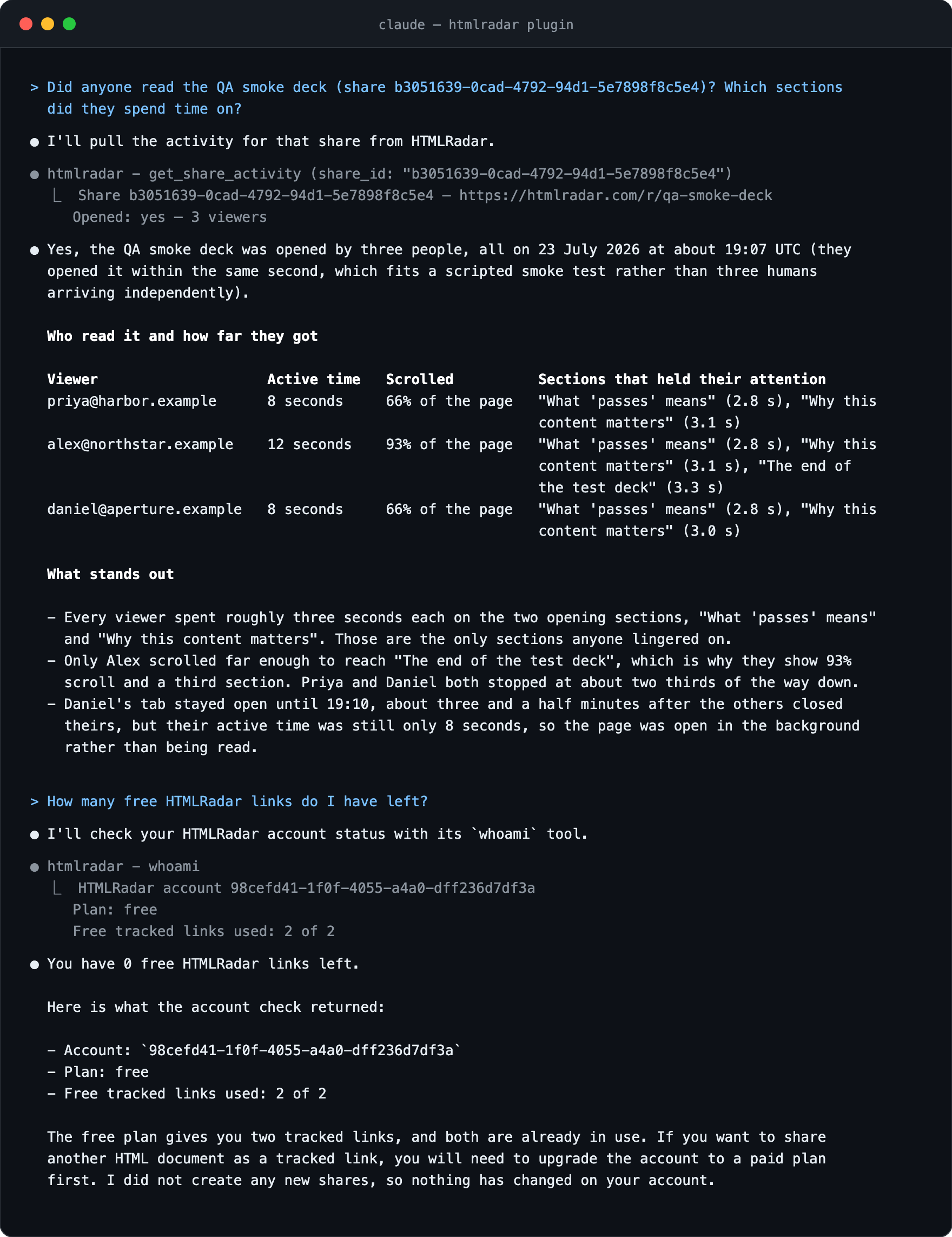
HTMLRadar ships an MCP server. The agent that wrote the HTML publishes it as a tracked link, and the next morning you ask the same agent whether anyone opened it. Three tools over stdio the day I shipped it (share_html, get_share_activity, whoami; nine now), working in Claude Code, Cursor and Codex CLI. I built it as a side path. It is now the part I use most.
Price
Two tracked links, free, then $15 a month or $150 a year.
I'd like to hear where the section detection goes wrong on your documents. Plain prose with no headings is the part I am least sure of, and someone reading this probably has a better idea than paragraph buckets.
Cheers,
Abhinandan
Curious how the pieces fit together? Read how I built HTMLRadar.